Email Authentication Protocols to Protect Your Business

Email Authentication Protocols to Protect Your Business

By Peter Summers, vCIO

IN THIS ARTICLE: 

Email is an essential tool for businesses and individuals alike, making it a prime target for cybercriminals. Protecting your business against email-based attacks goes beyond having the latest threat detection tools and educating your users not to click on suspicious links.

Here are a few more technical email security measures, including DKIM, DMARC, and SPF, that organizations need to implement to cover their foundational bases.

Email Authentication Protocols: DKIM, DMARC, and SPF

DKIM, or DomainKeys Identified Mail

This is a protocol that enables email recipients to verify that an email is really from the sender it says it’s from and that it hasn’t been tampered with or modified during transit. DKIM works by adding a digital signature to the header of an email message when it’s sent. That signature is then verified by your email provider using a public key published in the DNS (Domain Name Server) records for the domain. If it’s checked and found to be a valid signature, the email is in fact from the sender it claims to be from and hasn’t been tampered with.

SPF, or Sender Policy Framework

SPF is an email authentication protocol that enables domain owners to specify which IP addresses are authorized to send emails on their behalf.

For this protocol, the domain owner publishes a list of authorized IP addresses in the DNS records for the domain. Email providers can use this information to confirm that emails claiming to be sent from this domain are truly coming from the approved list of IP addresses.

DMARC, or Domain-Based Message Authentication, Reporting, and Conformance

This protocol builds on DKIM and SPF by providing a way for domain owners to declare their email authentication policies and receive reports on how their emails are being handled by email providers. Giving domain owners this ability to keep an eye on their email traffic and detect unauthorized use of their domains can be incredibly useful for helping to prevent phishing and other kinds of email-based attacks.

A Dynamic Trio

DKIM, DMARC, and SPF work together behind the scenes to provide a more powerful defense against email-based attacks. Increasing the ability of email recipients to verify the authenticity of incoming email messages alone is a huge security improvement. Pair that with the ability for domain owners to specify the use of their domain name, monitor their email traffic, and detect and block unauthorized use of their domain name, and these protocols can help prevent phishing, spoofing, and other types of email fraud.

These protocols are more on the complex technical side, and they require careful planning and configuration. Be sure to work with experienced email security experts to set them up correctly and get your organization more protected against email-based security threats.


Already a client of CIO Solutions? Reach out to your vCIO to discuss DKIM, DMARC, and SPF and where it fits in your email security plan!

Not a client yet, but curious about learning how to boost your organization’s security posture? Let’s talk about your options!

Fast and Furious: Here Comes The ‘New Teams’

Fast and Furious: Here Comes The ‘New Teams’

By Josh Farlow, Director of Cloud Services

IN THIS ARTICLE: 

You have probably seen the Microsoft banners and pop-ups talking about New Teams a lot lately. So much so, that it has become something we click past and forget about. But did you know that Microsoft has set a deadline to switch all users over to the New Teams? And that date is coming up quickly.  

Starting in July, the Classic version of Teams will not be an option any longer. In this article, we’ll talk about some of the technical reasons for this shift, the new features of New Teams, and on a business level, what this mandatory change means for your planning (both immediate and in the future). 

A Foundational Shift for Better Performance 

Who doesn’t want better performance? That is really the name of the game with New Teams. The Classic version of Teams was based on Electron and was much harder to maintain, update, and develop because of the custom nature of the product. This also meant the performance was lackluster, with no roadmap to improve further. The only option was for Microsoft to scrap it entirely and start from scratch. 

Enter WebView2.  

Microsoft Edge WebView2 is a control platform that allows developers to embed web technologies such as HTML, CSS, and JavaScript in their native applications. It uses the Microsoft Edge browser as its rendering engine to display web content in applications. This means developers can write code for a website or web app, and then reuse that web code in their Windows application, saving time and effort. Sounds awesome, right?  

What all this means is New Teams will run faster, use fewer resources, and can be updated rapidly so new features and security patches can be applied sooner. New Teams is just the start; Microsoft is rolling out this platform across all apps. We will talk about that in the future, but the short story is that as this is rolled out, both the native apps (the one you open on a desktop) and the web apps will look the same and have the same features 

Security Developments in This New Model 

Since New Teams is built on an entirely new platform, that allowed Microsoft to rethink the strength of security within the code. Additionally, the deployment method used for New Teams is MSIX. This allows admins to push this out via Intune, as well as deploy it in a standard Windows Environment. When apps are deployed using MSIX, the location of the app install is invisible to the user, which ultimately provides better protection against attacks that would try to alter the installation. 

New Compatibility Requirements that Change the Legacy Game 

With the move to WebView2, the standardization across platforms (Web, Windows Native, MacOS, Citrix) will finally give us feature parity across platforms, not mixed experiences between each one.  

This is where Microsoft is drawing the line: the New Teams will NOT be supported on Server 2016 or Windows 10 LTSC or older.  

What this means: users who are running these versions (or older) will not be able to use the New Teams app. This could be a huge headache, especially considering how many businesses rely on Teams. 

However, there are a few directions to go. 

Immediate Solution: Run New Teams on the Web 

This may sound clunky, but if you recall from above, all platforms are the same experience with New Teams. The Web version is the same as the app version.  

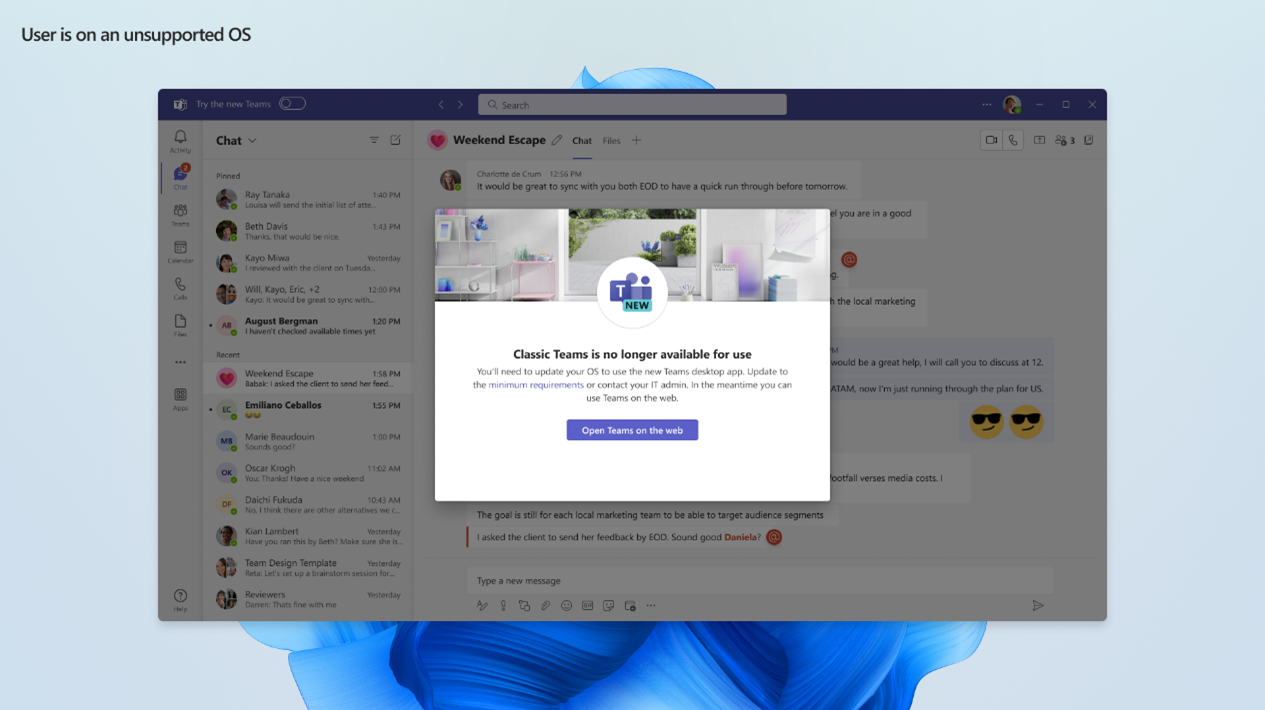
Once the deadline hits, Classic Teams will not open or function. Users will be automatically redirected to use the Web version, so they will simply run New Teams from their browser instead. This is the message users will receive:

Long-Term Solutions: Consider This in Your Planning 

As you can see, Microsoft’s move to New Teams is more than a refresh of a product, a game changer in architecture, design, and performance for not only this app, but the whole ecosystem moving forward. These changes will continue to create a ripple effect for customers, especially ones on an older operating system. 

If you’ve been considering a server upgrade, or are thinking about what’s next for your cloud environment, here are some options to consider:  

Upgrade to Server OS 2022 

What better time to upgrade than now? Whether you’re running your own servers on-premises or using a private cloud solution (like the CIO Private Cloud*), if your infrastructure relies on Server 2016 or older, a server upgrade may be the best next move for you.  

*Despite Server 2022 having been around for a couple of years, it has finally reached the stage of maturity to now make it a viable standard platform for our CIO Private Cloud Desktop. Please reach out to your vCIO to discuss your current server year and explore server upgrade options.

Evaluate the Next Wave of Cloud Solutions 

  • VDI (Virtual Desktop Infrastructure) is a cloud desktop model recently made available within the managed services space. This infrastructure design is a shift from the classic Server Operating System model to a per-user Windows 11 Desktop Operating System one. It offers many productivity and performance benefits beyond just being compatible with New Teams. A solution like this could solve some of your business’s current challenges and pave the way for future advancements.

Interested in learning more about VDI? Reach out to your vCIO for a demo. It’s very impressive and I highly recommend taking a look!

  • Modern Office – Serverless architecture is a newer model of cloud computing that relies on Software as a Service (SaaS) solutions (primarily Microsoft 365), and the individual user’s workstation. This model would offer a great path forward as Microsoft continues to roll out this new architecture for the M365 suite, however, it requires careful consideration. This model is only a fit for specific business cases, so be sure to talk with your IT provider in depth before making a switch! 

Check out our on-demand webinar about CIO’s next-generation Cloud Desktop (VDI) and Modern Office [here]!  

Embracing the New Teams 

I hope this helps shed some light on what these seemingly random pop-ups and banners are about the “New Teams”. Now you know, this is more than just a new look, it really is a whole new Teams, especially under the hood.  

Knowing more about this now, it may seem like a big inconvenience is on the horizon. In some ways that’s true, but luckily there are options, both temporary and in the long run, to prepare your business to continue to adapt with the always-changing world of productivity solutions.  


Are you a current client of CIO Solutions? Please feel free to reach out with any questions or concerns! We look forward to helping everyone with this transition.

Not a client yet? Let’s explore your options!

A vCIO’s Perspective on MFA: Importance and Implementation

A vCIO’s Perspective on MFA: Importance and Implementation

By Joseph King, vCIO

IN THIS ARTICLE: 

I work with clients across every imaginable industry on a daily basis as a CIO Solutions vCIO. One thing that is true for every business, no matter the industry, is the need to safeguard sensitive information. Today, it’s foundational that every business uses multifactor authentication (MFA) on their critical platforms. But despite its undeniable importance, implementing MFA often faces resistance.  

Resistance to MFA Implementation: Acknowledging the Concerns 

Implementing MFA is not always met with open arms, and I understand that. Here are a few reasons some businesses hesitate to adopt this crucial security measure: 

  • Perceived Complexity: One of the main reasons businesses might resist implementing MFA is the fear that adding an additional layer of security might disrupt their operations or require extensive training for employees.
  • Employee Pushback: The prospect of incorporating extra steps into the authentication process may be met with apprehension, as individuals might find it inconvenient or time-consuming. If businesses have had challenges with employees adopting new technologies, this tends to be a concern.
  • Initial Setup Challenges: The fear of potential disruptions during the transition to MFA can create a reluctance to embrace it. 

The Pitfalls of Resistance: A vCIO’s Perspective 

While the concerns mentioned above are valid, they are only temporary discomforts. The risk of choosing not to adopt MFA on key business applications is much more significant than the potential nuisances during the transition. Let’s take a look. 

  • Incomplete Security Posture: Relying solely on passwords in an age of sophisticated cyber threats is like leaving a gate open to your business. MFA isn’t the end-all and be-all, but it’s one additional layer of prevention to a catastrophe.
  • Vulnerability to Phishing Attacks: Hackers love phishing attacks. MFA acts as a powerful shield against these attacks. Even if a user unknowingly falls victim to a phishing attempt and gives up their password to a threat actor, you still have that additional MFA defense in place that the bad guys don’t have.
  • Regulatory Compliance Concerns: Whether you’re trying to qualify for Cyber-liability insurance for your business (which you should be trying to do) or work in an industry that is subject to stringent regulatory standards, neglecting MFA puts you behind and at risk for a.) not qualifying for insurance or b.) being at risk for compliance consequences.  

How to Move Forward with MFA Implementation 

Multi-factor authentication is an investment in fortifying your digital defenses and ensuring the longevity of your business. Which applications are the most important for your business? Where do you store customer data? Financial information? Those should be priority number one. 

Advising a business on Multi-Factor Authentication (MFA) implementation requires a strategic approach to ensure a smooth transition while maximizing security benefits. Here are some key steps:

  1. Conduct a Security Assessment:
    • Conducting a comprehensive security assessment will identify existing vulnerabilities, potential risks, and areas where MFA can strengthen authentication processes. This assessment will provide valuable insights into the business’s current security posture and help prioritize MFA implementation efforts.
  2. Educate Stakeholders:
    • Key business stakeholders must be educated on the importance of MFA in enhancing security. The risks of relying solely on passwords and the benefits of adopting MFA, such as reducing the risk of unauthorized access and protecting sensitive data, need to be communicated and understood.
  3. Align with Business Objectives:
    • Aligning the MFA implementation strategy with the business’s broader business objectives and priorities is important. MFA supports and furthers many key initiatives, such as regulatory compliance, data protection, and maintaining customer trust, and highlighting this is useful for many stakeholders.
  4. Select the Right MFA Solution:
    • Selecting the MFA solution that best meets a business’s unique needs and requirements will ensure that the solution is a fit for successful adoption. It’s key to consider factors such as user experience, scalability, integration capabilities, and cost-effectiveness.
  5. Develop a Phased Implementation Plan:
    • Developing a phased implementation plan that outlines the steps involved in rolling out MFA across the organization makes the task of implementation much smoother. Start with a pilot program involving a small group of users or departments to test the MFA solution and gather feedback. Then, gradually expand the rollout to additional users and systems based on the lessons learned.
  6. Provide Training and Support:
    • Offering comprehensive training and support ensures a smooth transition to MFA. It’s key to provide clear instructions, step-by-step guides, and training sessions to educate users on how to set up and use MFA effectively.
  7. Monitor and Measure Effectiveness:
    • Implementing mechanisms to monitor the effectiveness of MFA implementation and measure its impact on security metrics will continuously boost the business’s security posture. Regularly reviewing and analyzing security logs and reports will allow for the identification of any anomalies or security threats.
  8. Stay Updated and Evolve:
    • The security world is constantly changing to adapt to threats. Staying informed about the latest developments in MFA technologies and best practices is crucial. A business’s MFA strategy should continuously be evaluated and updated to adapt to evolving security threats and changing business requirements.

In Conclusion

When a business decides to hold off on implementing MFA, that decision to avoid the temporary discomfort of adopting a new technology keeps them at an unnecessarily high degree of risk. Unfortunately, these days it’s not a question of “if” a business will experience a breach, it’s a question of “when”. Without this foundational tool in place, securing the business is significantly harder, and breaches are much more detrimental. 

All this to say, there are clear and tested paths forward to ensure that implementing MFA for your business is seamless and effective. I have seen this collection of steps work effectively for businesses of all sizes time and time again, and the risks of delaying by far outweigh the effort upfront of biting the MFA bullet.


Not sure where to start with MFA implementation? Don’t hesitate to reach out to your vCIO or Customer Success Manager!

Not a CIO Solutions client? Contact us to explore your options for securing and managing your IT!

Migrating from a File Server to OneDrive & SharePoint? Consider This

Migrating from a File Server to OneDrive & SharePoint? Consider This

By Josh Farlow, Director of Cloud Services

IN THIS ARTICLE: 

“Modern Office”: This may be a term you have heard, but it does not describe the updated finishes on your office building. Let’s talk about what Modern Office means and some of the important logistical considerations to keep in mind when it comes when making the leap to Modern Office solutions for File Management.

Modern Office refers to a business computing model defined by:

  1. Serverless Architecture – No more servers in your server closet or in a data center
  2. SaaS (Software as a Service) based applications – All apps are “in the Cloud”, and typically include Microsoft 365 in some form. In other words, they are software services paid on a subscription basis and hosted in a data center somewhere in the world.
  3. Modern File Management – File storage and management within OneDrive and SharePoint instead of a dedicated file server.

The appeal of embracing aspects of the Modern Office model, particularly the M365 (Microsoft 365) ecosystem and vision, is undeniable. It promises so many benefits: Intune for device management, Autopilot for ease of onboarding new users/computers, browser-based applications, and a combination of the performance of local resources with cloud flexibility.

Ditching the servers entirely and moving operations 100% toward a serverless Modern Office model is only feasible for certain businesses. But across the board, businesses are starting to incorporate one key piece of this Modern Office model into their operations: File Storage and Management via OneDrive and SharePoint in M365. However, there are many considerations and challenges to consider when making this transition.

The Power of OneDrive and SharePoint 

The OneDrive and SharePoint platforms are the foundations of cloud-based collaboration and storage within the M365 ecosystem. They empower users to seamlessly access, share, and collaborate on documents – the dream for a modern, interconnected workspace.

However, because they’re so foundational, before you jump in, it’s important to bear in mind that a thoughtful, strategic approach will help you not only maximize their effectiveness but also avoid potential pitfalls.

Strategic Considerations

It would be great if the transition was as simple as uploading your files and calling it a day. A few challenges keep things interesting.

Syncing Issues and File Corruption– File corruption is a common issue since the underlying technology of these cloud platforms is different from your traditional file servers.

  • Because they speak a different language, a direct transfer of the existing file server structure may lead to problems that interrupt user productivity. If many of your files are suddenly corrupted when users try to access them, they may find themselves spending the rest of the day on the phone with the support.
  • OneDrive software can simply stop working or syncing. This can be caused by a myriad of issues such as token expirations, local resource contention, file path limitations, number of files syncing limits, etc.
  • File folder sizes can cause issues if there are too many folders within folders.

Third-Party Application Integration– The nature of your data and how users synchronize it can play a pivotal role.

  • SharePoint in particular poses a unique challenge. A write-heavy application may demand synchronization with multiple users, increasing the odds of metadata synchronization issues or corruption.
  • Applications that need to write back to a file server would first need to be pointed to a SharePoint document library. However, the way the application talks to SharePoint can cause major performance issues that would need to be accounted for.

Strategies & Tools for a Smooth Transition 

If you’re thinking that moving to OneDrive and SharePoint sounded great at first, but now it seems like a nightmare. Fortunately, there are strategies and innovative tools to make it easier!

  • Reducing Complexity

Let’s talk strategy first. One of the simplest and most effective approaches is to create multiple SharePoint sites rather than one all-encompassing one for all the company’s data. Often this looks like department or team-specific SharePoint sites.

Approaching your data in these smaller segments of department or team data serves a dual purpose – it reduces the number of users connecting to their respective document libraries at any time, and it trims down the size of data and the number of files. By doing so, the likelihood of metadata synchronization issues is significantly decreased.

  • Tools for a Seamless Migration

Effective tools have emerged to simplify this migration process, like Cloud Drive Mapper by IAM Cloud, for instance. Rather than relying on a syncing tool (OneDrive client), Cloud Drive Mapper operates in the same way as a mapped network drive, such as your S: drive, in a traditional file system. Cloud Drive Mapper facilitates seamless mapping of drives to M365 to provide a real-time connection to the SharePoint document library, no syncing required, no metadata issues. 

Unlocking the Potential 

In the grand scheme of things, embracing the power of OneDrive and SharePoint for file management can be revolutionary for your business. However, as we’ve explored in this article, the journey requires a strategic mindset and a proactive approach to navigate and avoid potential challenges.

As our team has seen in the real world, thoughtful consideration, coupled with tools like Cloud Drive Mapper, can pave the way for a seamless transition and ensure businesses can unlock the full potential of these Modern Office solutions without the headache and loss of productivity that might occur by jumping in blindly.


Are you a current client of CIO Solutions? Talk to your vCIO to continue the conversation!

Not a client yet, but curious about maturing your productivity tools? Let’s talk!

Forming Your IT Dream Team: Building an Effective IT Steering Committee

Forming Your IT Dream Team: Building an Effective IT Steering Committee

By Sean Gill, Director of Client Strategy

IN THIS ARTICLE: 

Technology plays a pivotal role in driving companies forward in today’s business landscape. However, for many business owners and decision-makers, navigating the intricacies of IT and getting the right input from the right stakeholders can be challenging.  

To streamline this process, we recommend establishing an IT Steering Committee within your organization. This ensures seamless alignment of your IT services with your business goals. 

The Role of an IT Steering Committee 

An IT Steering Committee serves as a cornerstone for aligning technology initiatives with your broader business goals. Bringing together diverse expertise from within your organization within this committee ensures that IT decisions are not made in isolation. This provides the opportunity for representatives from various departments and management levels to collaborate and ensure that IT initiatives are in harmony with the organization’s vision. 

Examples of roles that may be part of an IT Steering Committee: 

  • Chief Executive Officer (CEO) or Chief Operations Officer (COO): High-level strategic guidance and organizational objectives  
  • Chief Financial Officer (CFO): Budgetary and financial insights and alignment 
  • CIO or IT Director: Providing strategic direction and oversight for all IT initiatives.  
  • HR Representative: Human resource factors such as training needs related to IT, organizational changes, hiring projections, etc. 
  • Key departmental leaders: Offering pertinent operational information and insight or bringing technology needs to the team for deliberation and decision. 
  • IT Manager or IT Team Lead (for companies with in-house IT teams): Technical expertise and practical insights. 

Including an appropriate combination of these key stakeholders in planning conversations with your IT service provider’s Client Strategy Team can be a winning combination. 

The Value of Integrating your IT Provider into your Committee 

Next comes the “IT” part of the Steering Committee: your IT provider’s Client Strategy resources. For clients of CIO Solutions, this would be your vCIO and/or Client Success Manager. 

Our advisors use their experience and in-depth knowledge of client needs, industry trends, and emerging technologies to contribute valuable guidance in your IT Steering Committee conversations. These insights can help bridge the gap between technical capabilities and practical business requirements.  

The combination of all these perspectives ensures that the committee is tailoring your business’s IT strategies to meet technical standards and directly address your specific needs. This leads to more personalized and effective solutions. 

Steps to Establish an Effective IT Steering Committee 

Creating an effective IT Steering Committee involves several key steps.  

  1. Identify the right individuals within the organization who offer diverse perspectives and expertise for this committee. This is essential. 
  2. Establish a structured meeting format and frequency to ensure consistent progress and accountability. 
  3. Define clear rules for decision-making so the discussions lead to practical, actionable results. 

Maximizing the Impact of Your IT Steering Committee: Collaboration Between Your Stakeholders and Your Client Strategy Team 

Imagine the collaboration in action: your business’s real-world needs and roadblocks meeting the practical and technical guidance of your IT provider’s Client Strategy team. This synergy between your needs and technical options is transformative. 

Take inspiration from one of our actual client examples, we’ll call them ACME Corporation. After hitting internal resistance to moving key IT initiatives forward, the COO decided it was time to create an IT Steering Committee that included themself (COO), their VP of Engineering, their CFO, and the CIO Solutions vCIO. This team’s goal was to review open issues affecting the business that required a change to technology implementation, as well as future projects that would require technology inputs to be completed successfully. Specifically, they were able to plan and implement security initiatives that achieved the company’s compliance needs.  

By meeting regularly, they tailored their solutions to match their business requirements, including those of individual departments and avoided potential backtracking and unanticipated issues that might have occurred if those key stakeholders’ perspectives hadn’t been included in the original plan. This resulted in a significant increase in project success and overall satisfaction for ACME Corp, exemplifying the tangible benefits of such collaboration. 

Conclusion 

To wrap it up, forming an IT Steering Committee and integrating that with the expert resources your IT provider offers is key. It ensures that tech planning doesn’t occur in a vacuum but instead aligns with broader business goals so that your investments directly enhance your business productivity and satisfaction.


ABOUT THE AUTHOR

Sean has been shaping the IT strategies of businesses across a wide range of industries and sizes for over 10 years. He leads the Client Strategy team at CIO Solutions, while working with business leaders every day to create a clear IT vision, mature technology solutions, and ultimately, enhance business productivity and security through technology.

He and the rest of the Strategic Client Services team at CIO Solutions are constantly evaluating important trends in the industry and advising clients on best practices and long-term IT strategies for success.


Not sure where to start with establishing an IT Steering Committee? Don’t hesitate to reach out to your vCIO or Client Success Manager!

Not a CIO Solutions client? Contact us to explore your options!

Supporting Users While Safeguarding Against Social Engineering

Supporting Users While Safeguarding Against Social Engineering

By Eric Egolf, CEO

Cyberattacks have evolved in many ways, and one major concern on the rise is the surge in social engineering threats targeting support teams. The MGM hacks made headlines recently for this when a straightforward call to the help desk resulted in a major security breach. It was a wake-up call to the IT industry at large. 

In that case, a hacker manipulated the help desk into changing a user’s phone number. The attacker then had control over not only the user’s credentials but also the power to approve MFA requests, granting them access to the company’s systems. This unfortunate event underscored the urgent need to verify users’ identities before implementing security and access-related changes. 

Focusing on User Authentication Solutions 

IT providers and support teams are increasingly focused on the importance of verifying user identities before making critical security changes. Think password changes, MFA settings, or access permissions. The goal is to ensure that these requests are coming from legitimate sources within the organization. 

CIO Solutions has utilized various techniques, like passphrases, for high-compliance businesses. While effective, these methods aren’t suitable for widespread use due to their potential clunkiness and incompatibility with our “First Call Resolution” support approach. 

So, what are the more effective strategies to bridge this security gap? 

  • User MFA Verification: Registering cell phones for currently approved users and requesting MFA during support interactions. 

When users contact support for significant security-related changes (such as password modifications, security access grants, or MFA number updates), the support agent would send an MFA verification code to that user’s registered number. The user would then need to confirm their identity by sharing the code with the support agent before the change could be made. 

  • Designated Approval Contacts: Establishing pre-designated company contacts to serve as Security Approvers. 

In situations where registering all users’ cell phone numbers isn’t possible, businesses would designate Security Approvers beforehand. When employees contact support for security-related changes, the support team would contact the pre-designated Security Approver for verification and approval, adding an extra layer of validation.  

These methods are some examples of how the issue may be addressed, and they are continually evolving. The goal is simple: ensure every security-impacting change is authorized as legitimate. Note: Regular support requests wouldn’t require this verification, only security-impacting ones. 

But here’s the thing—these methods require a team effort between your company and your IT team. Keeping databases updated with accurate employee information and increasing communication between your company and your IT provider is crucial. 

At CIO Solutions, we are actively evaluating and implementing the best solutions to balance increased security measures without disrupting the support experience —we understand the importance of both.

As business leaders, we need to acknowledge the value of these security measures, as well as the risk of not implementing them. Together, by remaining proactive and collaborative, we can continue to strengthen our defenses and stay ahead of evolving cyber threats.  


Not a client yet, but wondering how to improve your IT experience? Let’s talk!

A Hands-On Deep Dive Into CrowdStrike Identity Protection

By Eric Egolf, CEO

As system administrators navigating the intricate web of cybersecurity solutions, we often uncover hidden gems that revolutionize our approach to managing digital security. One such treasure within the CrowdStrike suite is the Identity Protection Module (IDP).

As we began exploring this module, we recognized the possibilities it offered but finding detailed guidance was a challenge. That’s why we created this “CrowdStrike Identity Protection Overview”- for other system administrators seeking insights. Our aim? To offer a guide, complete with step-by-step screenshots and real-life examples showcasing how this tool transformed our daily workflows.

Throughout this overview, we’ll weave through practical scenarios, complemented by illustrative screenshots, showing how seamlessly the IDP module integrates into everyday administrative duties. By recounting our experiences and tangible gains, our goal is to demystify this tool and reveal its true potential, equipping fellow administrators with a thorough grasp of its capabilities.

An Administrator’s Need for CrowdStrike IDP

As system admins ourselves, we understand the quest for tools that promise value and truly deliver it consistently amid the daily grind of managing systems. The IDP module is often overlooked but holds incredible power. The implementation of this module into our suite of services has transformed our workflows, mitigated risks, and augmented our ability to maintain a secure digital environment for ourselves and our clients in this ever-evolving security landscape. It has provided proactive detection capabilities beyond what even the EDR platform can provide. As we move further into access being controlled by user identities, this tool will only become more essential.

Exploring CrowdStrike IDP Features: A Closer Look

Let’s dive right into it.

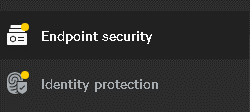
You’ll find the Identity Protection tab beneath the Endpoint Security tab in the CrowdStrike Falcon portal.
A Hands-On Deep Dive Into CrowdStrike Identity Protection

Domain Security Tab AKA “Risks”

The next part of the portal is what I call “the risks” section. It is referred to as the Monitor section. The first link in this section is to your “Domain Security Overview”.

This area is where you’ll find highlights of all the currently flagged risks. As you expand each risk, you will see an option to “show related entities”. Clicking on this will provide a full list of all the objects with that particular risk.

Compromised Passwords

In the example below, we have a list of compromised passwords, or what I refer to as “solved passwords”. These indicate users that are using passwords that are in existing rainbow tables on the dark web. These passwords pose a risk since they are much more susceptible to brute-force attacks.

A Hands-On Deep Dive Into CrowdStrike Identity Protection

The domain security overview, or risk section, shows you things (presumably) under your control that you can configure (change password, change GPO settings, change machine settings, etc.) to reduce your attack surface.

Privileged Accounts

The next link is super cool and shows you all the risks for Privileged accounts. Obviously, these represent a greater risk than other accounts because they have some level of administrative privileges in your environment.

A Hands-On Deep Dive Into CrowdStrike Identity Protection

One of the awesome capabilities this tool allows you is the ability to identify privileged accounts with “stealthy privileges”. That includes stale accounts, ones with compromised passwords, etc.

One cool thing I wasn’t aware of until we dove deeper was the honeytoken concept. This involves creating a deceptive account designed to lure potential attackers, labeling it as a “honeytoken account”. If it is ever accessed, it triggers an alert, so you know that you have a potential compromise on your hands.

CrowdStrike IDP provides this same view for all users, with ways to customize the widgets. It makes it easy to look at top user account lockouts, password changes, top password failures, and more; all with the same cool widget summarization seen above. It also offers links for risk analysis and event analysis (we don’t use these much ourselves, but they are powerful when needed).

Identity-Based Incidents Tab AKA “Detections”

Moving on from the risk section, we delve into the concept of detections. In CrowdStrike IDP this is called the Identity-Based Incidents tab. In the screenshot below you can see 3 detections (with names redacted).

Identity-Based Incidents Tab AKA “Detections”

Clicking on each gives you the expanded details (see below).

A Hands-On Deep Dive Into CrowdStrike Identity Protection

This gives us a summary of the accounts involved in the identity-based incident. In this case, it lets me know that a single account was involved and the alert was triggered because it logged into multiple servers.

Threat Hunter

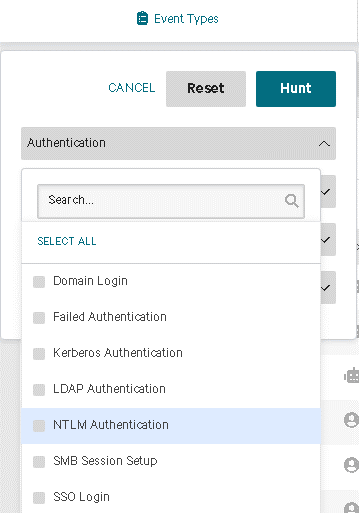
From there, I can move to the Threat Hunter section, prefiltered with this user (see below). In this example, we can see all the systems this user accessed and with which protocols. This gives us a more complete picture and helps us determine if further investigation is necessary.

Threat Hunter

The Threat Hunter is, in my experience, the best tool for quickly looking through authentication logs. This allows you to quickly filter based on event types, identities, source, and destination endpoints. A highlight here is that the event types are nicely enumerated for you. This means you don’t have to spend time trying to translate Windows event IDs. Everything is spelled out neatly in the search itself making it far more convenient than sifting through Windows event logs or creating custom parsers.

This tool simplifies understanding authentication and timelines, offering straightforward and intuitive filters that streamline the process significantly.
“Enforce” Module

“Enforce” Module

CrowdStrike IDP features an enforce module, and although we’re still exploring its capabilities, the most impactful use case we’ve witnessed involves implementing MFA enforcement for all privileged accounts using the RDP protocol. Anyone in the system admin space knows how hard this normally is.

With CrowdStrike IDP, it’s as straightforward as crafting a policy and ensuring the machines have the standard Falcon agent installed. Just like that, you can enable RDP MFA (using options like Microsoft Authenticator or any number of the other authenticators provided by CrowdStrike IDP) for all privileged accounts.

Programmatic Accounts

Additionally, you can also block RDP access for all “programmatic accounts” a concept tracked within CS IDP.

Hackers often exploit credentials from service accounts (known as “Programmatic Accounts” in CS IDP) which makes it amazingly powerful to have policies that prevent these accounts from using RDP with a simple, singular policy enforcement definition.

Regarding programmatic or service accounts, another noteworthy feature is the account profiling tool. For example, a service account usually runs on a single machine or has a very specific use pattern. Once that is profiled (after 60 days), if CrowdStrike detects a login to a system outside of this established profile, it triggers an alert. This gives you a new layer of detection capabilities that EDR and other systems would miss.

The ability of CS IDP to profile the login patterns of every account (including stale accounts) and alert you to anomalies in their usage relative to the normal pattern is extremely powerful. This.

Connectors

Finally, we have the connectors. In the example below, there’s a connector to Azure AD which is another identity provider outside of AD. CrowdStrike IDP pulls in this other Identity Provider data, giving you detections on this dataset just like the normal Active Directory detections discussed above. Setting this up is straightforward—simply create an enterprise app in Azure AD and connect it.

Currently, at the time of this writing, it can use Azure AD and Okta as external identity providers for monitoring and detection purposes.

Connectors

In Conclusion: CrowdStrike IDP is Powerful

The key takeaway here is that CrowdStrike IDP stands as an extremely powerful tool. Hopefully, this brief dive into some of the uses and settings gives you the confidence to try enabling it and exploring the functionality in your CrowdStrike Portal. We believe it’s one of the best security investments you can make!


Enhancing Cybersecurity with CrowdStrike Identity Protection

By Eric Egolf, CEO

In the realm of cybersecurity, staying ahead of threats is crucial. Organizations require comprehensive solutions that not only detect but also preemptively prevent potential breaches. CrowdStrike, recognized for its top-tier Endpoint Detection and Response (EDR), goes above and beyond by offering additional value-added modules. Among these is the CrowdStrike Identity Protection Module which stands out as a game-changer in the evolving landscape of digital risks.

Unveiling the Power of CrowdStrike Identity Protection

The allure of CrowdStrike isn’t merely its best-in-class EDR; it’s the supplementary capabilities like the Identity Protection Module that truly elevate its effect. This module is a force multiplier, offering functionalities akin to a Security Information and Event Management (SIEM) system at a fraction of the cost, especially when integrated with sources like Active Directory (AD).

Exposing Hidden Threats through Identity

This module broadens an organization’s detection capabilities, unveiling identity-related risks and abuse that traditional EDR systems overlook. For instance, it can identify anomalies like simultaneous logins from multiple locations using the same user account, a telltale indication of a high-security risk. With over 80 other detection capabilities, it ensures comprehensive coverage of identity-related threats.

Seamless Integration and Enhanced Visibility

CrowdStrike’s Identity Protection Module seamlessly integrates with common identity sources such as Azure AD and Active Directory, boosting detection capabilities and enhanced visibility into user account activities. This integration enables rapid identification of potential risks post-detection.

Leveraging Machine Learning for Proactive Defense

Another standout feature is the profiling function—facilitated by cutting-edge machine learning technology. Over a 60-day period, the module constructs user behavior profiles and promptly alerts administrators when any deviations are detected. This proactive approach enables swift response to potential breaches or unauthorized activities.

Combatting Dormant Threats and Unforeseen Usage

Additionally, the module can flag dormant or ‘stale’ accounts, like legacy service accounts, that suddenly attempt to log in. This is invaluable. Being alerted to these types of potential risks ensures your organization can take a proactive stance against unauthorized access attempts.

Empowering IT Departments with Cost-Effective Defense

CrowdStrike’s Identity Protection Module is more than a supplement to a powerful cybersecurity tool; it’s a necessity. It equips IT departments with an additional layer of detection and prevention capabilities, previously unattainable without traditional, more expensive SIEM solutions. Building on the CrowdStrike EDR platform, the Identity Protection module’s robust design, powerful features, and cost-effectiveness make it an indispensable choice for any organization seeking comprehensive cybersecurity solutions.

Strengthening Cyber Defenses with CrowdStrike Identity Protection

In the ongoing battle against cyber threats, CrowdStrike’s Identity Protection Module emerges as a force multiplier, empowering organizations to fortify their defenses, mitigate risks, and safeguard their digital landscapes efficiently and economically.


Are you a current client of CIO Solutions? Talk to your vCIO to continue the conversation!

Not a client yet, but wondering how to improve your business’s cybersecurity? Let’s talk!

Business-IT Alignment – The Secret to Propelling Your Business to New Heights

The Secret to Propelling Your Business to New Heights

By Sean Gill, Director of Client Strategy

IN THIS ARTICLE: 

For every business leader, the ultimate goal is not just to survive, but to thrive and achieve success. For any organization that depends on technology to operate, there is a crucial aspect that can significantly impact that journey- how well you align IT with your business objectives. 

“Business-IT Alignment” is a cool sounding buzzword, but what does it really mean?  

True alignment is not all that exciting or fancy. It’s not about adopting the newest, shiniest new tool or jumping on the latest buzz-worthy tech trends. Don’t get me wrong, we love exploring new tech and keeping an eye on what’s emerging as much as (well, more than) the next guy.  

But the real magic happens when your IT strategy is thoughtfully aligned with your business vision. In simplest terms, it’s about crafting a tailored IT roadmap that complements, supports, and enables your specific goals. 

Here are some best practices that help ensure your IT is on the same wavelength as your business objectives: 

  1. Share Your Vision 
    • Start by revisiting your business goals and vision. Share these with your IT team and service provider (that’s us!). Understanding your objectives lays the foundation for a powerful IT strategy. 
  2. Communicate Continuously 
    • Business-IT Alignment is a team effort. We recommend forming an IT steering committee that gets your key stakeholders, IT team/provider, and leaders involved. Decisions for your IT strategy can’t happen in a vacuum, they need to involve the valuable insights of these different company stakeholders to shape an effective IT roadmap. 
  3. Identify Pain Points 
    • Pinpoint IT challenges that are preventing your progress. Recurring problems can’t be solved unless they’re identified, and until they’re solved, they’ll keep holding you back and wasting time and money. Whether it’s outdated software or process bottlenecks, recognizing these pain points helps your IT partner tailor effective solutions. 
  4. Prioritize Security 
    • A strong cybersecurity framework is the backbone of any well-aligned IT strategy. Will an upgrade improve your security posture and protect your data? That should be a priority. Whether it’s upgrading outdated machines, implementing MFA on critical applications, or a focused push around anti-phishing employee education, security should always be part of the conversation and is often a good place to start.  
  5. Embrace Flexibility and Agility 
    • As we’ve seen in recent years, the business landscape can change rapidly. Your IT should be agile enough to keep up with the changing world AND the changes in your business. Ensure that your IT infrastructure is scalable and adaptable to accommodate expansion and new opportunities without disrupting your operations. 

These practices help ensure that you and your IT provider are on the same page when designing your IT future.

Sharing your business objectives with your IT team empowers them to give you expert advice and experiential insights about what will work best to get you where you want to go while solving for current pain points and accounting for other business considerations that might influence the timeline.  

It all starts with a conversation that includes key internal stakeholders and goes beyond the nitty gritty of IT. If done right, these conversations will lead to a deliberate technology roadmap that focuses on getting you to your goals.  


ABOUT THE AUTHOR

Sean has been shaping the IT strategies of businesses across a wide range of industries and sizes for over 10 years. As a vCIO at CIO Solutions, he works with business leaders every day to create a clear IT vision, mature technology solutions, and ultimately, enhance business productivity and security through technology.

He and the rest of the Strategic Client Services team at CIO Solutions are constantly evaluating important trends in the industry and advising clients on best practices and long-term IT strategies for success.


Are you a current client of CIO Solutions? Contact your vCIO to continue the conversation! 

Not a client yet? Contact us to see how we can help get your business where you want to be! 

Safeguarding Your Business Beyond Device Security: The Rising Importance of Identity Protection

By Eric Egolf, CEO

IN THIS ARTICLE:

In today’s digital landscape, IT security is a hot topic of discussion, and for good reason. Security is a constantly changing and complex field and while it may seem repetitive, as we rely on technology and digital interactions more for core business operations, companies have more to lose when their security posture is lacking. Staying ahead of the curve and paying attention to the emerging trends of IT security is now vital to keeping your business safe. 

In terms of priorities, securing individual endpoints (computers, laptops, servers, etc.) should be the initial step. If your organization hasn’t addressed this yet, that should be first and foremost. If you have this covered (maybe you have already implemented a solution such as CrowdStrike EDR), we can start to look ahead toward the next important concept on the rise: securing corporate user identities.  

User Identity- Who’s Who & What They Can Access 

A “user identity” is the digital version of who you are online. It includes things like your credentials (username and password), and other personal information that you use to access and control what you do on different websites and systems.

For our purposes, we will focus specifically on the corporate user identity (the usernames and passwords used to access your corporate data and applications) and how to secure it. Note that this does not include consumer user identity i.e., the credentials that employees use for personal online activity. 

When a user’s credentials are stolen, devastating credential abuse happens every day on devices without any security software. If your endpoints have powerful prevention, detection, and response capabilities, then the impact of this breach won’t be as disastrous as it would be on endpoints that aren’t secured.  

But considering how much power is associated with corporate user identities, it only makes sense that now, in addition to securing the endpoints, the next important security technology on the rise is identity protection- securing and detecting anomalies in the user identities accessing your business’s data.   

In the coming years, we see Identity Protection tools becoming equally as important as Endpoint Protection ones.  

On The Rise: Identity Protection Solutions 

Identity protection needs to be considered separately from securing a workstation. Endpoint security is done via software that is installed on the individual device or workstation (such as antivirus (AV) and Endpoint Detection Response (EDR) solutions).  

User Identity, on the other hand, is secured by monitoring databases of the corporate identities that access your business data. Identity Protection solutions catch risks in configuration and detect anomalies in credential usage.  

Some examples include: 

  • Someone logging in with a stale user account (user account that hasn’t been used in 90 days). 
  • Using a user account from a machine that doesn’t normally use it – different than baseline behavior.
  • Using an account from two geographically distributed locations, North and South California in the same hour.  

Identity Protection tools are an emerging technology that show incredible potential for increasing a business’s ability to detect and prevent user identity (specifically credential) abuse that they would have otherwise been blind to. 

At CIO Solutions, we offer CrowdStrike’s best-of-breed solutions including EDR and CrowdStrike’s latest module: Identity Protection. These solutions combine the power of modern Artificial Intelligence, a flexible cloud-native design, and now the power of Identity Protection logs to increase your organization’s security capabilities. 


Are you a current client of CIO Solutions? Talk to your vCIO to continue the conversation!

Not a client yet, but wondering how to improve your IT security? Let’s talk!