Employee Spotlight: Ignacio Monge

Behind the Screens- Meet Ignacio

Employee Spotlight: Ignacio Monge

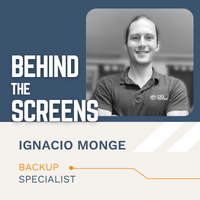
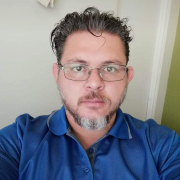
Ignacio is a skilled member of our backups team. They handle the managed backup services for our clients. Ignacio says, “we’re in charge of all backup services provided to our clients. This means keeping all machines’ backups done and working fine, also detecting issues or possible problems with the client machines. Additionally, we can also restore missing [backed up] files requested by clients. [I think this has a big impact on CIO Solutions offering quality service to our clients]” 

Ignacio is originally from Guanacaste where his family lives (along with their parakeet and six dogs). He now lives in San José, Costa Rica where he has been a member of the CIO Solutions team for 7 months! He has a wide range of skills- he’s an electric automotive mechanic and is about to finish a technician certification on electric vehicles!

For fun, he enjoys playing soccer and video games and enjoying the outdoors, whether that’s mountain biking, hiking, or spending time at the beach or rivers around the area!

Read on to learn more about Ignacio!


1. Who is your hero? Why?

I would not say one hero, I’d rather say my ‘heroes’, my family because they are always there to help no matter what.


2. What was the most unusual or interesting job you’ve had?

Once like 4 years ago I was a part-time taxi driver. That was for like 2 years.


3. If you could go back to any moment in time, when would it be?

When Nikola Tesla was alive and inventing something new, I would really like it if I had been there to see it and be a part of it.


4. Would you rather be the funniest or smartest person in the room? Why?

I don’t claim to be the funniest or smartest, I’m kind of a mix of those, but about the same as anyone else.


5. If you could learn to do anything, what would it be?

How to fly a plane.


6. If you could have an unlimited supply of one thing, what would it be?

Electricity


7. What’s something you’re planning on doing in the next year that you’ve never done?

Buy a car and start building a house.


8. What do you pretend to hate but actually love?

Avocado. 


9. What’s the weirdest food you’ve ever eaten? How was it?

In several cases, I have eaten rabbit and deer. 


10. If you could have any superpower, what would it be?

Absolutely fly!


—————————————————————————————————————————————————————-

Bonus: What 3 words would you use to describe CIO Solutions?

Innovative, trustful, secure


At CIO Solutions, we are proud of our team of skilled and friendly individuals. It’s a unique group of collaborators and innovators who share a common “can-do” mentality paired with a fondness for gifs and puns. 

Looking for opportunities to join our team? Visit our Careers page to see all open positions in our Santa Barbara, San Luis Obispo, and Fresno offices!


ABOUT CIO SOLUTIONS

As a premier Managed Service Provider, CIO Solutions takes the burden of managing IT off of our clients they can get back to focusing on their businesses. For over 30 years, CIO Solutions has been simplifying relationships with technology, while at the same time transforming it into a strategic asset to propel businesses forward.

Through full-service IT management (including daily technical support, ongoing maintenance, and strategic IT consulting) and modern solutions (including private cloud services), CIO Solutions supports businesses across industries and sizes throughout California and beyond.

[vc_row][vc_column][vc_btn title=”Contact Us” style=”custom” custom_background=”#fa8c19″ custom_text=”#ffffff” shape=”square” size=”lg” align=”center” link=”url:https%3A%2F%2Fwww.ciosolutions.com%2Fcontact%2F|title:Contact”][/vc_column][/vc_row]

Upgrade Your Tech BEFORE the End (of Life)

Upgrade tech BEFORE the End (of Life) 

By Sean Gill, vCIO 

“All good things must come to an end”, wrote Chaucer in his poem, Troilus and Criseyde. Alas, who knew that this would be particularly true in the realm of technology today? Many of us have fond memories of long-lost operating systems (Windows XP – we see you) or our favorite firewalls. But time and progress march ever onward and for the good of our organizations’ security and relevancy, we must keep up.

It’s generally understood that keeping systems up to date is important. But the ongoing work of keeping systems patched with the latest patches is only part of the equation. The other thing to keep in mind is the system’s overall usable timeframe or “End of Life” date.

IN THIS ARTICLE: 

“End of Life” and General lifespans

The “End of Life” (EoL) date is determined by the vendor. It marks the date when they will no longer support that technology (operating system, software version, etc.), and/or release any additional feature or security updates for that system.

The length of time before a system goes EoL differs depending on the type of system. In general, plan for the following life spans:

  • 2-4 years for software/line of business applications (depending on the vendor)
  • 3-5 years for workstations or laptops
  • 5 years for server hardware
  • 5 years for network hardware (firewalls, switches, etc.)
  • 10 years for Windows Operating Systems (from original launch date)

There are two approaches to dealing with system End of Life dates:  

  1. Create a strategic plan to proactively upgrade the systems over time
  2. Wait it out and, like an old car, drive the old system until it’s dead

You can probably guess which approach we advise.

While it may seem more cost-effective to keep a system until it dies, there are a lot of risks in this approach that far outweigh the upfront costs of replacing these systems sooner rather than later. Here are a few reasons why it is always a good practice to upgrade systems before they go completely “end of life”.

Reduce Security Vulnerabilities

In today’s day and age, security is at the top of most organizations’ list of concerns. Security is one of the biggest reasons to upgrade or replace older systems before their EoL dates. When a system reaches its End of Life, the vendor stops putting out security patches and stops all support for the system. Once this happens, that system becomes more insecure day by day. Threat actors know this and keep a close eye on these dates, waiting for the opportunity to exploit them.

Two current examples of this are the Windows 7 and Windows Server 2008 R2 operating systems. These were great OS’s but went End of Life in January of 2020. They are now a potential liability to organizations still using them, as hackers work to find unpatched vulnerabilities in these systems and put out exploits to take advantage of them. Replacing these systems sooner rather than later can dramatically improve an organization’s security posture.

Avoid Unexpected Hardware Failures

Like security, productivity is another business priority that suffers when End of Life dates are overlooked. If a company is running critical systems on older hardware or servers, eventually these hardware systems will fail, grinding productivity to a halt when it does. And if “Ol’ Murphy” has anything to say about it, this will happen at the most inopportune time like during month-end or some other critical crunch-time.

Planning ahead for hardware replacements can help businesses avoid unexpected failures and prevent lost productivity. In addition, proactive planning can help identify systems that might need special attention.

For example, perhaps there is an older financial software system that is business-critical but can only run on an operating system that’s reaching its End of Life date. Determining this early can help the business plan accordingly. Maybe they determine that the system can be upgraded. If not, and the system must be kept, they can plan for security contingencies like firewalling or air-gapping the system away from the rest of the production systems.

Access More Features and Work More Productively 

Upgrading systems that are going End of Life isn’t just about avoiding disaster. Embracing current systems sooner rather than later can unlock access to new feature sets, better performance, and more capabilities that were limited in the older system. In addition to being more secure and more reliable, this can also improve productivity and user experience.

Plan Ahead & Upgrade Sooner Rather Than Later 

We all wish that everything could be backward compatible. It would be so much easier if things just lasted and kept on lasting. But that is unfortunately not the reality. Software companies build their software on the backs of new coding techniques and technologies which allows them to give us the feature sets we ask for. As those technologies advance, we need to keep up to be able to run the new system. As mentioned earlier – time and progress marches on, and so must we. Hopefully, these insights help explain why it is important to upgrade systems before their official End of Life.

Do you have any outdated systems that come to mind in your business? It may be time to put an upgrade plan in place!


ABOUT THE AUTHOR

Sean has been shaping the IT strategies of businesses across a wide range of industries and sizes for over 10 years. As a vCIO at CIO Solutions, he works with business leaders every day to create a clear IT vision, mature technology solutions, and ultimately, enhance business productivity and security through technology.

He and the rest of the Strategic Client Services team at CIO Solutions are constantly evaluating important trends in the industry and advising clients on best practices and long-term IT strategies for success.


Are you a current client of CIO Solutions? Contact your vCIO or Client Success Manager to do a review of your systems! 

Not a client yet, but curious about maturing your IT plan? Let’s talk!

Employee Spotlight: Cahil Mignault

Behind the Screens- Meet Cahil Mignault

Employee Spotlight: Cahil MignaultCahil has been a part of Team CIO for just over 3 years now. Raised in the Carpinteria area, he has been living in Santa Barbara for 15 years. He is based out of our Santa Barbara office where he works as a member of CIO’s Rapid Response Team (RRT). This team serves as the first responders of the Support process. In this dynamic role, he enjoys getting to meet and support all of the businesses we work with across regions.

He finds excitement in starting a call not knowing what the client’s going to need- something simple like getting their account unlocked, or more complex, like bringing up a network that is down.

Outside of work, he’s an outdoor enthusiast who loves rock climbing, backpacking, surfing, paddleboarding, and mountain biking. His border collie pup, Matcha, is the energetic partner to his adventurous lifestyle.

“Have you had 4 shots of espresso at once before? She is the result. She makes sure I don’t slow down” he says. “She is great off-leash and I’m looking forward to having some downhill mountain biking races with her in our backcountry and having her as my paddleboard copilot this summer!”

Read on to learn more about Cahil!


1. If you could go back to any moment in time, when would it be?

It would be pretty fun to meet the Wright brothers and test out their aircraft on the day they first flew.


2. Would you rather be the funniest or smartest person in the room?

I would rather be the smartest person in the room.


3. If you could learn to do anything, what would it be?

I wish I could go back in time to 3rd grade and stick with learning the saxophone… I took it for about a week and had a broken piece at the top of the saxophone. When we had a test and I couldn’t play “Mary Had a Little Lamb”, but instead a bunch of horrible squeaking noises, I was kicked out of the band. I could be playing some seriously smooth jazz right now.


4. If you could have an unlimited supply of one thing, what would it be?

I’ve definitely never said I have too many avocados, I’ll take an unlimited batch!


5. What’s something you’re planning on doing in the next year that you’ve never done?

The goal is to try a multiday paddleboarding trip around Lake Tahoe. There is a water trail where you can paddle from camp to camp around the perimeter of the lake.


6. What’s your favorite TV show?

How I Met Your Mother is one of my all-time favorites.


7. What’s the weirdest food you’ve ever eaten? How was it?

Crocodile… It tastes like chicken but the texture was like fish? I can’t say I would go for it again.


8. If you could have any superpower, what would it be?

I mean, who doesn’t want to be able to fly?


9. What could you give a 30-minute presentation on without any advance preparation?

What you would need to start rock climbing and belaying your partner.


10. If your life were a movie, who would play you?

I have weirdly gotten related to Joseph Gordon-Levitt many times before, I’ll stick with that!


—————————————————————————————————————————————————————-

Bonus: What 3 words would you use to describe CIO Solutions?

Cooperative, Knowledgeable, Rad!


At CIO Solutions, we are proud of our team of skilled and friendly individuals. It’s a unique group of collaborators and innovators who share a common “can-do” mentality paired with a fondness for gifs and puns. 

Looking for opportunities to join our team? Visit our Careers page to see all open positions in our Santa Barbara, San Luis Obispo, and Fresno offices!


ABOUT CIO SOLUTIONS

As a premier Managed Service Provider, CIO Solutions takes the burden of managing IT off of our clients they can get back to focusing on their businesses. For over 30 years, CIO Solutions has been simplifying relationships with technology, while at the same time transforming it into a strategic asset to propel businesses forward.

Through full-service IT management (including daily technical support, ongoing maintenance, and strategic IT consulting) and modern solutions (including private cloud services), CIO Solutions supports businesses across industries and sizes throughout California and beyond.

[vc_row][vc_column][vc_btn title=”Contact Us” style=”custom” custom_background=”#fa8c19″ custom_text=”#ffffff” shape=”square” size=”lg” align=”center” link=”url:https%3A%2F%2Fwww.ciosolutions.com%2Fcontact%2F|title:Contact”][/vc_column][/vc_row]

Email Safety | 5 Ways to Spot a “Phishy” Email

Quick Tips & Best Practices

We rely on email for many functions of business today. This makes it an excellent tool for bad actors to exploit. Email is one of the quickest and easiest opportunities threat actors have at their disposal.

Threat actors have gotten good at using our busy days and frequent use of email to trick users into providing information, making mistakes, or taking actions. That may look like tricking an Accounts Payable employee into wiring payments to a different account number or getting a user to enter login credentials by pretending to be a well-known company and sending a fake “response required”, “unusual activity”, or “update account details” email.

In the busy day-to-day, here are a couple of tips to keep in mind for practicing email safety both in your work and personal life so you don’t fall victim to these manipulation tactics.

5 Signs an Email Is Suspicious

Bad actors find success when their targets are busy, hurried, and accept things at face value. When you get a suspicious email, PAUSE and check to see if any of these signs are present:

P Passwords or sensitive info requested Pay attention to what the email is asking you to provide (passwords, social security numbers, account information, credit card info, etc.). This information shouldn’t be shared via email.
A Attachments you weren’t expecting Don’t trust attachments you didn’t ask for and avoid opening invoices, Word docs, and any other attachments that you didn’t request or weren’t expecting
U Urgency or intensity in the tone Notice the tone- is the sender requesting secrecy, stating something is past due or urgent, and generally trying to make you react quickly?
S Sender name & domain don’t match Check if the sender’s display name and email address don’t match, (name shows as John Smith, but the email is ra4azeu526@gmail.com) or if the email address domain is unfamiliar (usually from @company.com but this email is coming from @business.com)
E Errors in spelling & grammar Particularly from reputable, large companies, pay attention to spelling and grammar mistakes

Best practices if you think an email is suspicious:

  • HOVER, don’t click
    • Don’t blindly trust the display text, use your cursor to hover over links. This will display what the embedded link address is and give you more information. When in doubt, don’t click.
  • DELETE, don’t engage
    • Err on the side of caution and delete the email from your inbox rather than unsubscribing or engaging with it at all.
  • VERIFY, use a different method of communication to verify the source
    • Don’t respond to the email. Call, text, or chat with colleagues/vendors/executives to verify that email requests are from them.
  • LEAVE, go directly to vendor websites instead of through the email
    • Open your browser and go directly to the company’s website to log in to any accounts, change passwords, etc. Don’t go from any links in the email to reset passwords.

When it comes to email safety, be extremely skeptical.

This is an area in which it’s good to be hesitant, exercise extreme caution, and be wary. Email is quick and convenient, but now more than ever it’s important to slow down, stay vigilant, verify often, and change up communication methods.  


Are you a current client of CIO Solutions? Contact your vCIO or Customer Success Manager to continue the conversation around your IT security and anti-phishing education tools!   

Not a client yet, but curious about maturing your IT solutions? Let’s talk!

Reframing Your Approach to IT Security Decisions

By Sean Gill, vCIO 

The IT security landscape has continued to shift rapidly over the past couple of years. Threat actors leverage creative social engineering techniques, phishing and spoofing threats are continuously rising, zero-day vulnerabilities are exploited, and ransomware is at large. Businesses are more reliant on technology than ever before, and the industry continues to move toward SaaS (software as a service) solutions like Microsoft 365, shifting company data online and increasing the importance of adapting security best practices.

With rising threats and more at risk reputationally, financially, and operationally, it’s important that businesses adapt the way they think about security to meet these changing times. Taking an attitude of “if it ain’t broke, don’t fix it” or choosing to delay making changes “until it becomes a problem” can be devastating to a business.

Unfortunately, many companies still think that IT security breaches are a problem that only hits those unlucky few. But the reality is, the frequency and variety of threats turns the unlucky “few” into the unlucky “many”. Everyone knows a business that has experienced a compromise. We want to help you avoid becoming one of them.

Modernizing how we think about security 

Business owners and decision-makers now find themselves more involved in the nuances of IT security decisions in ways that they didn’t used to be. If this is true for your business, you’ll know that one of the frustrating challenges is figuring out how to keep up with security and associated IT jargon, especially when your core focus is, appropriately, on running the business and servicing your clients.

As the nature of threats and risks to businesses continues to change, how you think about security should as well. In this article, we will give you a simple framework that aims to help you conceptualize IT security and serve as an outline for making decisions.

IT Security Framework: Prevention, Detection, Response 

There are three key pillars to a thorough IT security framework: Prevention, Detection, and Response. Keeping these in mind when assessing IT security strategy can help ensure that in the budgeting and planning process, your organization doesn’t overload on one area and neglect another.

Prevention Pillar 

Historically, this category is where IT security spending primarily occurred. These solutions were the first (and often primary) line of security against threats. It is still an important focus, but no longer to the exclusion of the others.

Think of your business like a house. This would be like ensuring your locks work and installing a strong gate. These tools are there to prevent a break-in.

Technologies and practices that fall under this pillar of “Prevention” include: 

  • Firewalls – Perimeter security that blocks access to internal networks 
  • Antivirus – Software that recognizes and stops malware and viruses before they take hold and spread 
  • Password Policies– The practices of changing passwords frequently to prevent lost or stolen passwords from being used to access corporate resources 

All these are examples of Prevention security and are still valid and necessary today. But now, in addition to these, it’s important to consider additional ways of preventing malicious actors from getting in and gaining a foothold. Multi-factor authentication (MFA) and leveraging Artificial Intelligence (via Endpoint Detection and Response or EDR) are among the new technologies to improve the stack.

Multi-factor authentication is an essential component in your security foundation, and for good reason. As the name suggests, MFA requires a user to authenticate themselves more than once when trying to access company resources like your Microsoft 365 ecosystem. In contrast to simply providing a password (which could be compromised) to login, MFA also requires that the user supply more verification in the form of something they know, something they have, and, in some cases, something they are.  

This includes some combination of a traditional username and password (something known) and a digital token or code sent to a user’s mobile phone (something they have), and additionally, with most mobile phones incorporating some form of biometrics such as a fingerprint reader or facial recognition, (something they are). 

If your business requires users to utilize MFA for access, hackers will be prevented from accessing systems even if they come to possess a user’s password. This tool has given businesses of all sizes an additional layer of prevention capabilities in today’s landscape and has shifted from being nice to have, to a security standard across the industry.

Likewise, the use of Artificial Intelligence via Endpoint Detection and Response (EDR) has revolutionized traditional antivirus software. Traditionally, antivirus solutions were binary and merely reported on whether malware was or was not present – usually based on a set of definitions or some light heuristics. EDR moves beyond that. Instead of simply preventing known malware and viruses, in an EDR system, the antivirus feeds into and informs a more sophisticated detection and response platform. The use of Endpoint Detection and Response is continuing to become a requirement. In fact, most insurance companies require an EDR solution to purchase a cybersecurity insurance policy.

Detection Pillar

While everyone hopes that their Prevention stack is sufficient to keep out all the bad guys, the way the threat landscape has evolved, this is now just not the case. Even with a good prevention stack, bad actors still find creative new ways in and will spend time in your environment observing patterns and trends, waiting for their time to make a move – exfiltration of data, ransomware, or account takeovers. This is known as “dwell time”. Because of this, the Detection Pillar of the security framework may arguably be the next most important.

A traditional antivirus solution won’t detect if a system is still compromised after the initial compromise. If the bad actor is leaving traces of activity, without a detection tool like EDR, this trail will not be easy to find.

EDR keeps track of everything that has happened-from how a bad actor got in, to which systems or files were accessed, to newly spawned processes. This log of events is referred to as the “kill chain.” The kill chain provides an in-depth understanding of exactly which processes ran or files were touched. This ability to detect and understand all activities, in turn, allows for more certainty when remediating any exploit. From this information, it’s possible to determine if a threat has or has not been fully cleansed and shows exactly what systems should be reviewed for compromise.

Let’s go back to the analogy of your business as a home. Advanced detection tools like EDR are like installing a security camera system. You can detect suspicious activity early, be alerted to it, and if there is a break-in, have clear records of what occurred. 

Response Pillar 

Responding appropriately to any given event is essential – this applies to all areas of life, including our IT Security Framework. This pillar includes the tools and resources you would employ should a breach occur. This can be small (a plan for cleaning out all traces of a malicious actor) to large (hiring a forensics team, communicating to clients, and filing an insurance claim).

An effective Response Pillar includes creating playbooks for how to respond in different scenarios. Does your Security team or IT Steering Committee need to meet? Are there any reporting requirements for clients? Does a Cybersecurity insurance claim need to be opened? Do Business Continuity or Disaster Recovery plans need to be implemented? These reactions can, and should, be thought about before they are needed. Table-top exercises with the Executive Team can be a great way to brainstorm about various scenarios and how the organization should act if they were to arise.

To continue the home security analogy, our locks and gate (Antivirus and MFA) attempted to prevent the break-in. But when that didn’t deter the invader, our security system detected that something was wrong, and the camera (EDR) recorded everything. After reviewing the footage (EDR data) and assessing what happened (was anything taken, was anyone hurt, is the intruder still there?), we can respond and take appropriate action.

Was the alarm triggered by suspicious activity (antivirus quarantined a malicious file) and no actual break-in occurred? Or was the incident serious (a Zero-Day exploit that allowed bad actors inside the network) and do we need to call for help? 

We can see how all the previous pillars of the security framework support our abilities in the response pillar. Particularly the detection tools like EDR data, without which, analyzing risk and appropriate action becomes very difficult. Without this kind of clear insight, the organization may take actions disproportionate to what is needed – either by overreacting and spending unnecessary time and resources or by underreacting and opening themselves up to more risk.

IT Planning 

We all know that protecting our companies’ infrastructure is critical to the success of the business. The foundational requirements for securing your business have shifted to meet the demands of today’s current security landscape, and they will continue to change over time. If your business is part of an industry with inherently high-security compliance demands (like legal or medical businesses), it’s likely you’ve already been implementing modern tools to maintain the highest level of compliance. On the other hand, if your industry has less stringent security compliance regulations, your business may have historically viewed advanced security tools as “nice to have” but not necessary. Unfortunately, the reality of the world today makes that mindset a luxury that no business can afford.

The best place to start is by evaluating your current solutions with these three pillars in mind. With a better understanding of this framework, how does your security stack up? Has your organization implemented modern prevention tools such as MFA? Do you have an EDR solution in place to bolster your prevention and detection abilities? Have you mapped out a response plan? If not, the first step is discussing your security with your IT expert!


ABOUT THE AUTHOR

Sean has been shaping the IT strategies of businesses across a wide range of industries and sizes for over 10 years. As a vCIO at CIO Solutions, he works with business leaders every day to create a clear IT vision, mature technology solutions, and ultimately, enhance business productivity and security through technology.

He and the rest of the Strategic Client Services team at CIO Solutions are constantly evaluating important trends in the industry and advising clients on best practices and long-term IT strategies for success.


Are you a current client of CIO Solutions? Contact your vCIO or Customer Success Manager to continue the conversation around your IT security!   

Not a client yet, but curious about maturing your IT security? Let’s talk!

How to ride a wave of ravenous demand for products and services

By Russ Levanway, President

Last year, so many of us had to cope with things we never even considered would happen. I don’t have to go into detail, of course — we all lived it. From working remotely, to COVID protocols, to people getting sick or losing a loved one, to isolation, and the commingling of personal and work life, the social fabric of humanity most definitely frayed.

But humanity is resilient. We came into 2021 with new hope and good momentum. You can see that momentum in people’s pent-up demand for goods and services after living without for a year. We want to travel again. We want a new car or a new home. The demand is enormous, and it’s created a strain that we haven’t really witnessed in recent memory.

More, more more

Underlying all this is a supply chain bottleneck. The supply chain is impacted whenever factories shut down, shipping becomes tapped out, trucking companies can’t find enough drivers to hire, and a thousand other factors. It’s all driving up inflation to levels we haven’t seen since the 1970s, and at an astonishing rate.

The strain has hit every kind of business, including ours. Core infrastructures like switches and servers are much more difficult to find and cost significantly more than they have in the past. The strain has also hit our employees with high prices, myself included. I’m not just referring to the ridiculous increase in home prices; I’m talking about the basics. Everything just costs more.

Whether it’s a temporary or long-term change, I won’t attempt to predict. But, as a company, we don’t want to be caught flat-footed in this new reality, however long it lasts.

The benefits of being nimble and scrappy

How do we begin to support our employees and clients under price and availability limitations? We start by keeping close track of our team composition, recognizing that financial difficulties and high inflation are real considerations, and taking steps to help our employees out.

We’ve also become really creative with buying and procuring equipment. Our procurement team scrounges around on random websites for a laptop here, a switch there. Often, we can’t go with Plan A, so we come up with a Plan B or even Plan C. Sometimes, we just have to tell the client that we can’t get them the piece they want — or at least not yet. In certain cases, we can provide loaner equipment; I’ve watched employees raid the e-waste pile for a temporary switch that will do for our client until the permanent switch comes in.

Baked-in flexibility

How have we been able to stay creative and adaptable? I think we handle change well because it’s been in our DNA from the beginning. Long before COVID struck, we built our company to guard against rigidity or strict adherence to doing things only one way. We fostered a very innovative problem-solving culture. Those measures and methods we set in motion years ago have served us well.

In this time of unprecedented new challenges, have you been flexible and adaptable? Many organizations have evolved while others have fallen by the wayside. And then there are those organizations that hung on tight to the belief that everything would go back to “normal” when COVID ended: everyone in the office again, packing the conference room, meeting up for a happy hour at 5 o’clock, etc. They believed (hoped?) that COVID was just a rude interruption.

I don’t believe that’s true. Are you an organization that has embraced adaptability in your culture? That will be critical to retaining your employees and coming up with innovative solutions for your customers. Start now, if you haven’t already; this might be our new normal.

CIO Solutions’ President Russ Levanway Expands His “Reach” in San Luis Obispo

FOR IMMEDIATE RELEASE

CIO Solutions’ President Russ Levanway Expands His “Reach” in San Luis Obispo

September 24, 2021, San Luis Obispo, Calif. – Fulfilling a personal mission, CIO Solutions’ President, Russ Levanway, is moving forward with a planned multi-month professional transition from his corporate job to the non-profit world in San Luis Obispo. CIO Solutions, where he has worked for the last four years following the company’s acquisition of TekTegrity, provides premier IT services and IT management solutions to a whole host of companies ranging from 10 to 500 employees in San Luis Obispo, Santa Barbara, and Fresno Counties — the widest range of IT Management Solutions available for companies who want premier local support.

“When CIO Solutions acquired TekTegrity four years ago, and I remained as President after 12 years with the latter company while Eric Egolf continued his role of CEO, it was with the goal of successfully merging both teams to provide better service to our clients,” Mr. Levanway explained. “TekTegrity moved under the company mantle of ‘CIO Solutions’. Since then, we have successfully completed some major mutual milestones that were key to the success of the alliance between CIO & TekTegrity.  Biggest among those was a true integration of our companies – culturally, as well as merging our leadership teams, operations, and our joint way of doing things. I couldn’t be happier with the outcome and feel that I have completed my combined 16-year mission with both companies. I’m ready to give back to the community in a new way and plan to slowly transition into a new role over several months starting in November – to work on the team of a local nonprofit that is focused on regional economic development. It’s a win-win all the way around.”

“CIO Solutions inherited a strong management team from Russ and TekTegrity,” Mr. Egolf said, “one that merged well with our own team. The group is now one cohesive wholea unified company of people who share a similar passion for IT Management, with a solid focus on community.  We are thrilled that we have reached a collective point where Russ can now continue the journey he has wanted for a long time — to use his talents in the non-profit world while letting the team he helped develop at CIO Solutions take the company to new heights.”

“We withstood a big test this last year through COVID,” Mr. Levanway added. “Covid had the potential to cause chaos within our organization, but instead we continued to thrive, because our culture was strong enough to weather it.  I’m really proud of what Eric and our entire crew have accomplished, and I feel great that I was able to play a big role in this growing company’s success.

With 85 employees and an eye toward more hiring, CIO Solutions currently has the widest range of IT Management Solutions available for companies who want top-of-the-line, 24/7 local support.

“CIO Solutions, with Eric Egolf’s leadership, has built a strong brand throughout San Luis Obispo, Santa Barbara and Fresno Counties,” Mr. Levanway continued, “by fiercely focusing on customer service, with a simultaneous commitment to building a fun, vibrant office culture with growth opportunities for the team.  With this and certain other key milestones on a very good trajectory, I feel it is time to begin the process of a leadership transition and  hand off, over the next several months, the reins of my day-to-day responsibilities to other members of our CIO team who’ve earned the opportunity to grow their own careers.  I am looking forward to a new personal chapter of increased local involvement in San Luis Obispo.”

Mr. Levanway will slowly transition from CIO Solutions to a non-profit called REACH, a regional economic action coalition uniting public, private and civic leaders with a common vision and mission to increase economic prosperity and quality of life across the Central Coast of California. To learn more, visit www.ciosolutions.com or phone CIO Solutions-SLO at 1.888.662.9084.

Ditch the Drama: 5 Ways to Stay Ahead of The Hackers

By Russ Levanway

Ransomware attacks are getting to the point where they are becoming existential threats to organizations and can disrupt entire industries and supply chains.  If it wasn’t serious before, it is now.  Furthermore, hackers are increasingly sophisticated and daring, and are often backed by foreign governments bent on destabilizing, stealing intellectual property, or just plain old making money via extortion.  The risks of a confidential data leak are higher than they’ve ever been before.

One of the questions I get asked regularly is: “What can I do to protect myself from data infiltration?”

The first step is arming yourself with an understanding of how these threat actors operate. The second step is realizing that effective cybersecurity isn’t a question of simply having current antivirus installed. In today’s world, threats are varied in nature, and an effective cybersecurity toolset must be multi-dimensional. [READ: Understanding the Enemy + Why Your Antivirus isn’t Enough.]

Here are the 5 best things you can do to protect your business and stay ahead of the hackers:

#1 Keep learning

As cliché as it is, “knowledge is power”. The most powerful line of defense is prevention and education.

We continually have to remind people of that. Thankfully, at CIO Solutions we have long been offering anti-phishing educational tools to clients. These include a valuable training tool that enables your company to educate users in real-time. Through simulations, training videos, and more this tool can make users aware of phishing and empower them to identify and avoid it. We provide this to most of our customers, but its efficacy is only as good as the business’s willingness to put in the work.

To reap the benefits of a program like this, users have to engage with the orientations and training videos; they don’t work by osmosis. Businesses that embrace these trainings and stress their importance are better off than those that don’t. Often, it’s the companies whose employees skip the trainings that wind up incapacitated by a phishing attack, desperately in need of our help to clean up a mess.

#2 Remember your backups

We were recently engaged by a cybersecurity forensics firm to help a large organization that was mismanaging its backups. Sadly, they had been infected with ransomware and all their data was encrypted, including their backups. The data was not recoverable because of the encryption, and the ransom was beyond what they could afford.

Moral of the story? Backups and protection are key. Never skimp on backups and be sure they are set up properly with an onsite and offsite copy that is firewalled from the regular network.

#3 Invest in cyber liability insurance

We consistently recommend cyber liability insurance. Businesses insure against fire, flood, and theft of property. Based on prevalence, cyber-attacks should now be listed among those sorts of catastrophes.

Cyber liability insurance is extremely valuable and, in the grand scheme of things, pretty affordable. Consider the astronomical cost of getting attacked: loss of business, forced shutdown, frustration, and paying for IT help (not to mention the financial costs incurred by paying a ransom). It can be crippling if your data is encrypted. Several days may pass before you can get your network running again. You may even need forensic help to get back online, investigate whether your data was stolen, and prevent further attacks.

Bottom line: If (or when) that happens, cyber liability insurance is a small price to pay for protection.

#4 Look into Endpoint Detection and Response (EDR)

Don’t confuse EDR with antivirus protection. Antivirus software can detect known threats and prevent the installation or deployment of known viruses. EDR can detect variants to patterns in both software and user behavior.

Let’s say Joe’s computer typically downloads 100MB a day from the internet. One day it reverses and uploads 100MB to the internet. EDR will see that as suspicious and flag it.

In our effort to stay at the forefront of cyber-attack prevention, CIO Solutions now offers CrowdStrike, a very advanced EDR tool. A cybersecurity forensics firm we work closely with thoroughly vetted it as a best of breed solution.  As recently as a year ago, the program was outside most organizations’ budget, but today it’s far more affordably priced. Are you a current client of CIO Solutions with questions about CrowdStrike? Don’t hesitate to ask.

#5 Enable Multi-Factor Authentication (MFA)

You’ve probably gotten used to the number of websites these days that won’t let you in with a plain old password. Your bank probably also texts or emails you a security code. You might even have an application on your phone called an Authenticator app with rolling codes that you have to enter to log in.

These are all examples of MFA.

Your business ought to implement MFA on key applications as well. This tool has quickly become a standard in the evolving security landscape. Even if someone DOES get your password, it is useless without the other authentication factor. The second piece to grant access is the security code that will only come up on your phone (which they don’t have). We highly recommend this.

Don’t put off to tomorrow what you can do today

The bad news: hackers will always be a threat.

The good news: there are effective ways to protect yourself, but you have to deploy them now.

Armed with that information, how will you begin protecting yourself from ransomware, phishing, and data infiltration?  How can we help?

Santa Barbara Airbus

Santa Barbara Airbus

Name

Samantha Onnen

Position

General Manager

Company Name

Company Name
Santa Barbara Airbus
Year Founded
1983
Industry
Transportation
What does your company do/what service does your company offer?
Santa Barbara Airbus runs daily shuttles to and from the Los Angeles International Airport, private charter bus, and Daytrip Adventures! Airbus is a service business that happens to run buses. We love interacting with our passengers and being a part of their travel or event needs!
What is the company’s mission?
Our mission is to improve our customer’s lives and our community through passenger transportation services
 What areas do you serve and what do you like best about doing business in those regions?
We serve the full Santa Barbara County. Our shuttles pick up in Goleta, Santa Barbara, and Carpinteria. Our private charter buses go where the client desires! We love being a part of the Santa Barbara Community, during our closure due to COVID this community has been so supportive and kind. We are so excited to get back to work for them!
 Who is your business’s ideal client?
Anyone that is eager and ready to travel!
What’s your favorite thing about the work that your company does?
I love that our company is small but mighty! We are focused on the people, be it customers or staff. The people that we work with are what makes us great!
What’s your favorite company activity? (team building, annual event, etc).
Every year we do a holiday lunch with as many staff members can come! I love getting to see everyone at one time and seeing some spouses and family!
What do you like best about working with CIO Solutions as your IT provider?
CIO has been a true partner during this difficult year. They understand where we are at and our needs and have worked hard to meet them. Joe, our VICO, is committed to our business being successful and wants CIO to help facilitate that. It is a great partnership.
Any exciting news to share? 
Airbus will be resuming our LAX service on Thursday, May 6th!!!

Santa Barbara Airbus Santa Barbara Airbus Santa Barbara Airbus

Employee Spotlight- Walter Vargas

NAME

Walter Vargas Barboza
 

JOB TITLE

NOC Technician
 

LOCATION

Costa Rica
Tell us a little about yourself!
  • I think I am a simple man that loves simple things like being in nature, riding bikes (I usually go to work by bike) or going hiking. I am a family man who loves spending time with my family, (wife , three daughters), and my friend Toti (dog). I like reading books about ufology, aliens (my wife thinks I am a little crazy by the way) and science fiction, I love the StarTrek TV series and Voyager is my favorite.
Where are you from?
  • I am from Costa Rica and I live in a town near the Costa Rica CIO’s office called Alajuelita that is very famous for its typical drinks (yes they have alcohol) like chicha and chinchivi made with barley and corn.
How long have you been working at CIO Solutions?
  • I have been working at CIO for about four years!
If you could visit anywhere in the world you’ve never been, where would you go?
  • I’d really love to go to Machu Picchu & Nazca in Peru to see for myself the amazing temples and vast network of lines and drawings of animals and plants credited to the Nazca culture
What’s your favorite famous or inspirational quote?
  • “Find a job you enjoy doing, and you will never have to work a day in your life.” from Mark Twain I think
How did you first learn about CIO Solutions?
  • I used to work at Tektegrity so I began hearing about CIO when we were told about companies merge!
Before working at CIO Solutions, what was the most unusual or interesting job you’ve ever had?
  • I use to work for SOS Kinderdorf International College and United World College Costa Rica where I had the opportunity to know many people from many countries all around the world.
What is the one food you cannot resist?
  • I love grilled meat with a very cold beer of course!
What could you give a 30-minute presentation about with no advance preparation?
  • I would say Excel
What is your proudest moment at CIO Solutions?
  • It was probably when I was mentioned in the spotlight section of the CIO’s newsletter for a stats little app I created to measure my work
Which one would you want most – flying cars, robot housekeepers, or moon cities?
  • moon cities
What are 3 words you’d use to describe CIO Solutions?
  • innovation, professionalism, and ethic